Built for comic writers

Comic script software that understands comics.

Purpose-built for comic scripts: page structure, panel flow, dialogue, and artist handoff. Write for the page. Hand off with confidence.

Early access macOS Windows
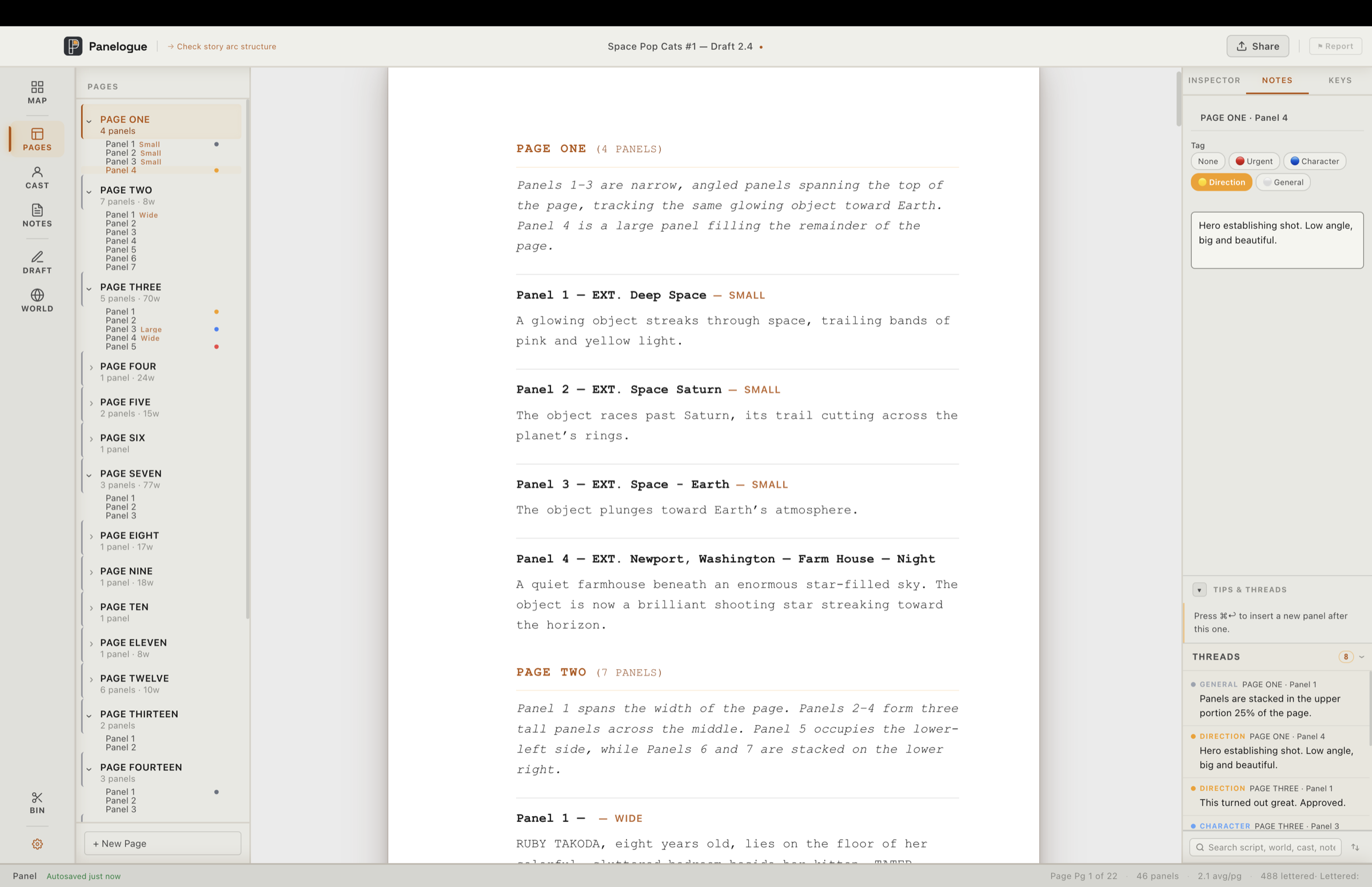
Panelogue script editor, page and panel structure with live notes
Auto panel organization
Panel note reminders
Tips & Threads

Screenwriting apps think in scenes. Word thinks in paragraphs. Neither thinks in pages and panels.

Purpose-built for comics

Issues, pages, panels, and spreads — the real units of a comic. Panels renumber themselves as you write.

Nine export formats

One script, tailored for every collaborator — a clean letterer PDF, an editable copy for the editor, and more.

Your files, your machine

Local-first on macOS and Windows. Your scripts stay yours. Always.

Painless editor handoff

Send your script to an editor and pull their notes back in a single click — then keep writing.

Editor Review

End the email-PDF-repeat loop.

One link turns your script into a review your editor marks up in any browser — no account, no install — and their notes flow straight back into your manuscript, pinned to the exact panels.

See how Editor Review works
Write
Smart Panels

Type the panel. Panelogue handles the rest.

As you write a panel heading, the busywork takes care of itself. Scene types, locations, and times of day autocomplete as you type. Add a layout with / — splash, wide, bleed, double-page spread — kept as clean metadata your artist reads, never clutter in your script. And every panel and page renumbers itself the moment you add, cut, or reorder.

  • Autocomplete for scene type, location & time of day
  • Slash picker for size, shape & treatment tags — carried into every export
  • Panels & pages renumber themselves as you add, cut, or reorder
Splash Wide Bleed Spread + 20 more
Space Pop Cats #1 — Draft 2.4
Page Health

Know when a page is too much before your artist does.

Every page is scored on the three things that actually break it: panel count, word load, and how many characters speak. Panelogue just shows you the facts — 9 panels · 287 words · 6 speakers — and flags the page Overloaded. It never tells you you’re wrong. It makes the load impossible to miss.

  • Comfortable, Tight, or Overloaded — scored on every page
  • Weighs panels, dialogue & caption words, and speaker count
  • Live health badges right on the Page Map
✓ Comfortable · Tight ⚠ Overloaded
Cast

Write a name. They exist.

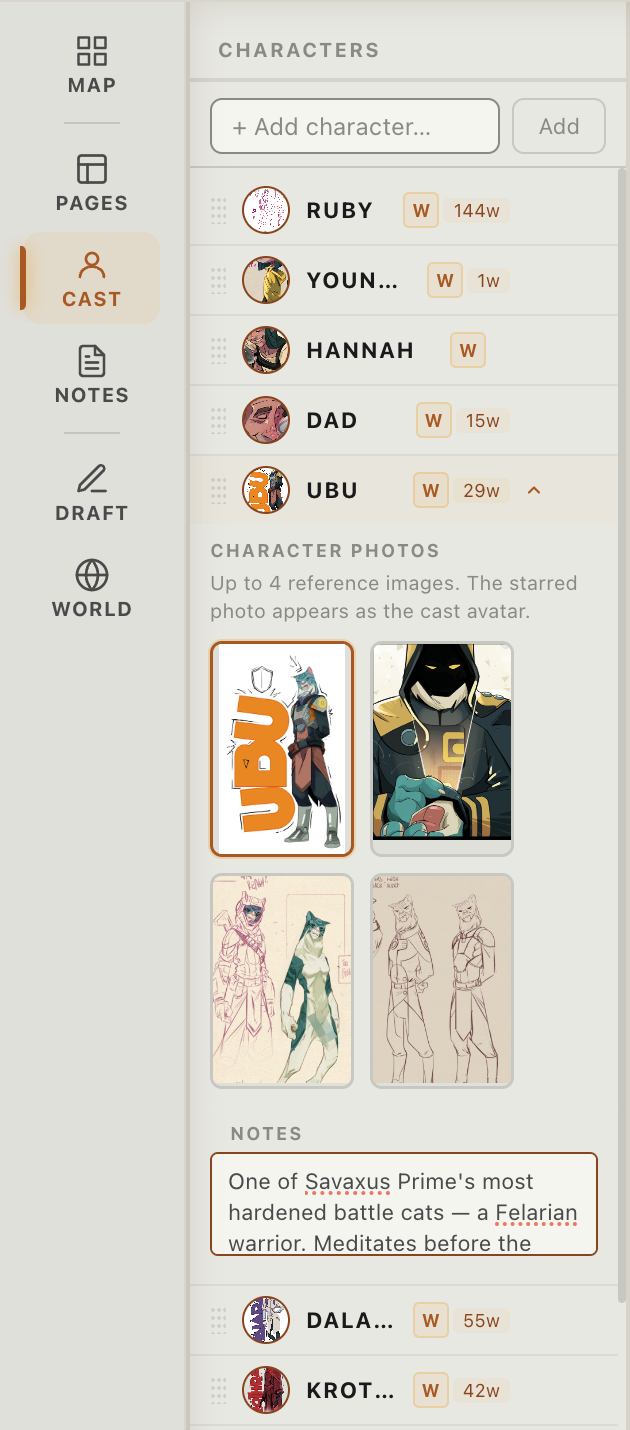
Type a character name in your script and Cast builds their entry on the spot. No forms, no imports, no setup. Just write, and your roster fills itself.

  • Characters appear the moment you name them
  • Add reference photos to bring every character to life
  • Word counts, appearances, dialogue load: tracked live
  • Synced directly with your World Building notes
Panelogue Cast panel with character list, word counts, and reference photos
Panelogue World Building panel — the Savaxus Prime location with reference photos, atmosphere, significance and lore notes
World Building

Your whole world, always within reach.

Locations, factions, lore, rules: structured and searchable, always one click away while you write. Not buried in a doc somewhere. Right here, in the same window.

  • Locations · Factions · Characters · Objects · Lore · Rules
  • Build any custom category your world demands
  • Character entries sync live with your Cast panel
Locations Factions Lore Rules + Custom
Plan
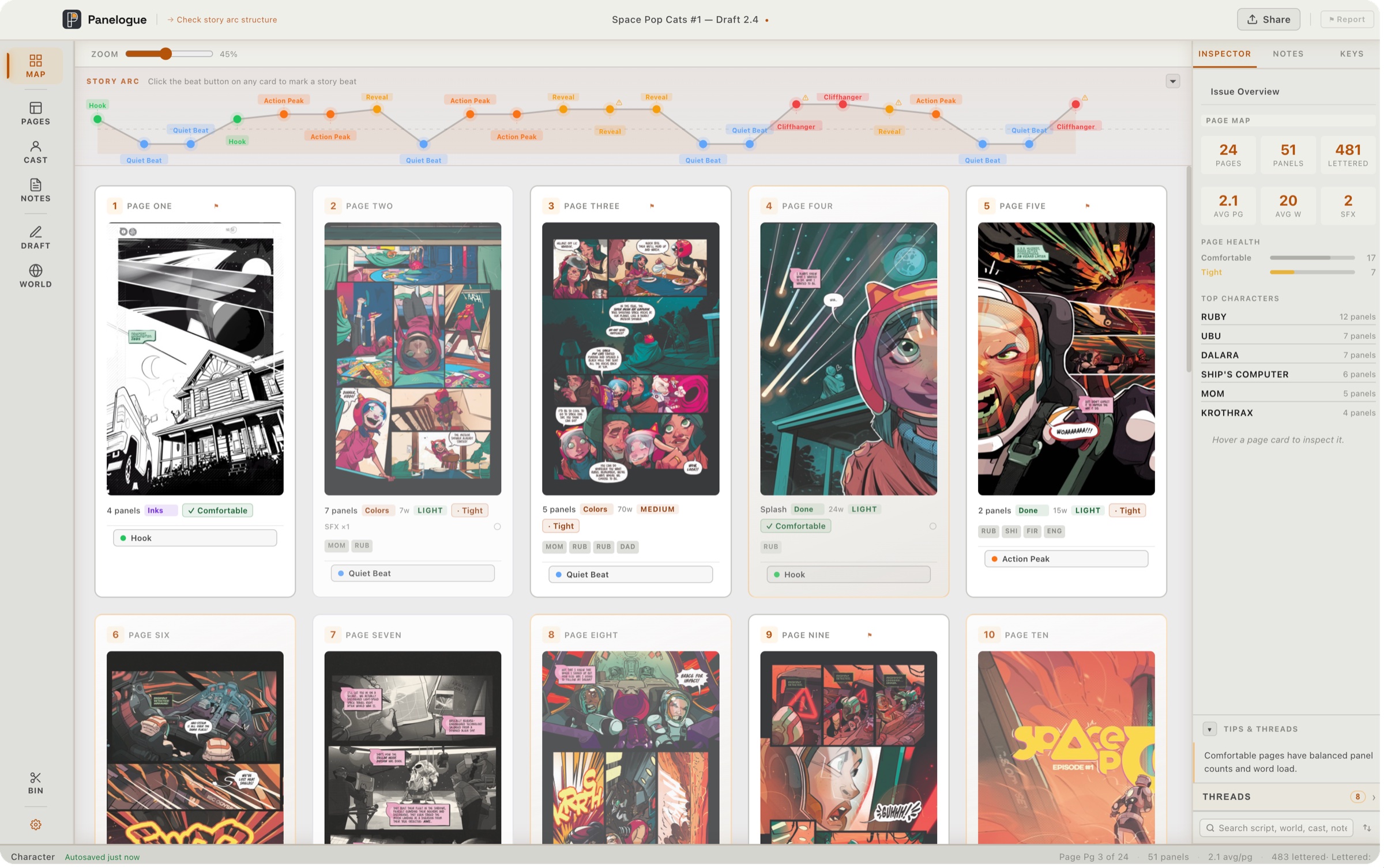
Panelogue Page Map, every page of an issue with production stages and page health
Page Map

See your entire issue before your artist does.

See every page at once. Spot the bloated act, the character who vanishes for twelve pages, the quiet beat in the wrong place, before your artist ever opens the file.

  • Pin reference art directly to any page
  • Track stage: Rough → Pencils → Inks → Colors → Done
  • Page density and health scored at a glance
0
pages tracked
0
production stages
Story Board

Plan in beats, not blank pages.

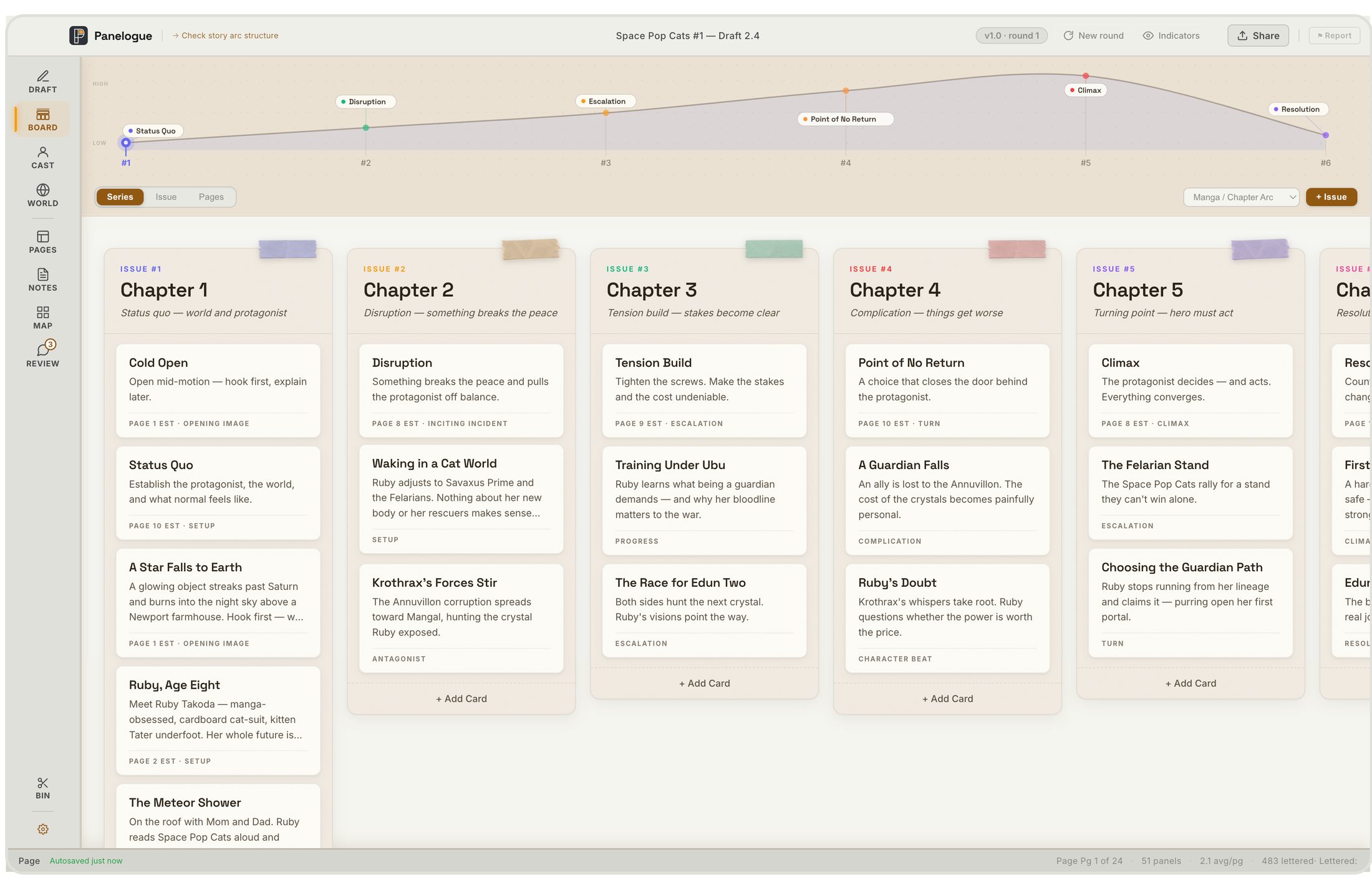
Break the issue into story beats and lay them out as cards. Panelogue links each beat to the script, so a card always shows its real page range, even after you rewrite and reorder. Plan the series, the issue, and the page from one board.

  • Series, Issue, and Pages views with an arc-tension rail
  • ✦ Suggest beats scans your script and proposes cards
  • Beats link to panels and survive any rewrite
Idea Scripted Penciled Inked Approved
Panelogue Story Board with beat cards organized into production-stage columns
Story Arc

Your story's shape, at a glance.

Tag every page with a beat: Hook, Quiet Beat, Action Peak, Reveal, Cliffhanger. Panelogue plots them as a tension curve, and fills it in automatically from your Story Board beats. See in one glance whether your third act has room to breathe, or your hook lands flat.

every beat, plotted automatically
STORY ARC Space Pop Cats #1 24 pages · 5 beat types
Hook Quiet Beat Hook Action Peak Quiet Beat Reveal Action Peak Quiet Beat Action Peak Reveal Action Peak Reveal Quiet Beat Cliffhanger Reveal Action Peak Quiet Beat Cliffhanger
Hook Quiet Beat Action Peak Reveal Cliffhanger
Hand off
Exports

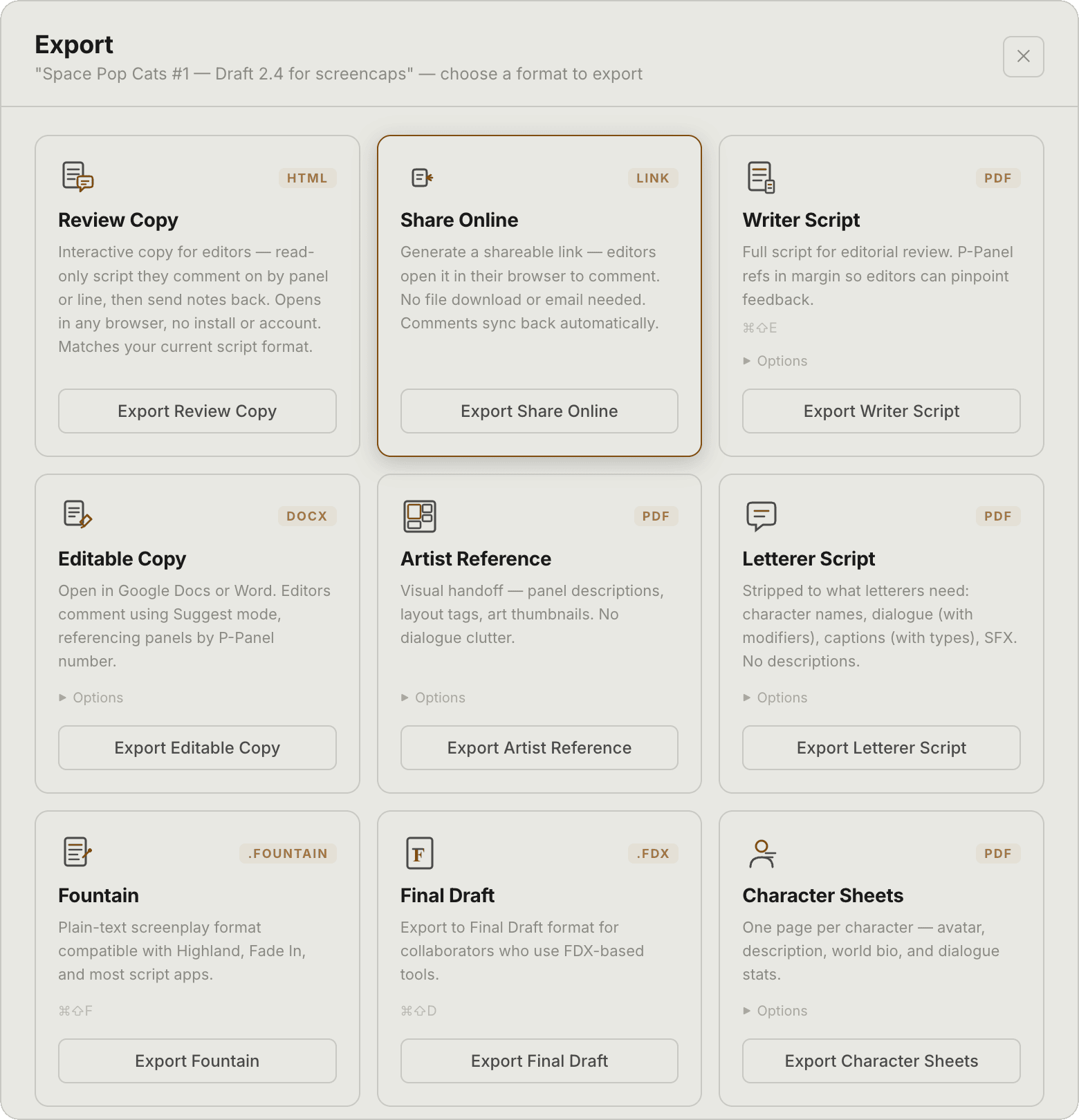
One script. Every format your team needs.

Tag notes for your artist, letterer, or editor. Each export delivers exactly what that person needs, nothing they don't. Pick a role to see what they get.

Panelogue
EXPORT
FDX
FOUNTAIN
RTF
R
PDF
DOCX
W
try the role filters
Writer Script
PDF

Full script for editorial review. Panel refs on every panel so editors can pinpoint feedback.

Editable Copy
DOCX

Open in Google Docs or Word. Editors comment in Suggest mode, referencing panels by number.

Artist Reference
PDF

Visual handoff: panel descriptions, layout tags, and panel refs. No dialogue clutter.

Letterer Script
PDF

Stripped to what letterers need: names, dialogue, captions, SFX. No descriptions.

Fountain
.FOUNTAIN

Plain-text screenplay format compatible with Highland, Fade In, and most script apps.

Final Draft
.FDX

Export to Final Draft format for collaborators who use FDX-based tools.

Character Sheets
PDF

One page per character: photo, description, world bio, and dialogue stats.

World Bible
PDF

Complete world-building document: all sections, entries, and notes in one reference.

Rich Text
RTF

Universal format: opens in Word, Pages, LibreOffice, and Google Docs.

Editor Review

Send it to your editor. Skip the runaround.

Getting notes from an editor usually means export a PDF, email it, wait, dig comments out of a reply, re-export — again and again. Panelogue collapses that into one link. Your editor opens it in any browser — no install, no account — and marks it up right on the page, panel by panel and line by line, in a review view that works just like Panelogue. The moment they comment, their notes land back in your script, pinned to the exact panels — and they stay pinned even after you rewrite around them.

  • One link (or a single self-contained file) — no install or account for your editor
  • Their notes return to your script the moment they comment
  • Comments stay pinned to stable panel IDs through every rewrite
Send Comment Pull back
your editor needs no account
Import

Already writing elsewhere?

Bring your script with you and keep writing — pages, panels, dialogue, and structure intact. Nothing to rebuild.

  • Final Draft .FDX and Fountain .ftn import
  • Page and panel structure auto-detected
  • Three layouts: Standard, Centered & Full Script
.FDX .FTN + more coming
Built for real issues

This is Space Pop Cats #1 living inside Panelogue, a full issue, structured, tracked, and ready to hand off.

0
Pages
0
Panels
0
Lettered lines
0
Export formats
Early Access

Write better comics.
Join Panelogue.

Early access opens in small waves — the waitlist is invited first, at the founding price. The price rises at public launch.

You're on the list. We'll be in touch.
✓ No credit card required ✓ Local-first, your scripts stay on your machine ✓ First invites, at the founding price ✓ Behind-the-scenes updates ✓ Direct input on features